SUMSELSELNEWS.CO.ID | Buat lo yang doyan ngutak-atik AI buat dapetin gambar street photography yang super realis, pasti tahu kalau kunci utamanya ada di prompt yang tepat. Nah, di artikel ini gue bakal kasih lo 10 contoh prompt hyper realistik buat street photography, plus cara gampang pakai prompt tersebut di Gemini. Tenang, bahasanya santai, gak pake ribet. Yuk langsung aja!
Apa Itu Hyper Realistic Street Photography di AI?
Hyper realistic street photography di AI itu gambar yang keliatan kayak beneran diambil sama fotografer profesional di jalanan. Detailnya tajam, lighting-nya dramatis, dan suasanya dapet banget. Prompt yang bagus harus nyakup elemen kayak lighting, composition, mood, sama resolusi. Gemini bisa bantu lo nyusun prompt ciamik ini, lho.
10 Prompt AI Hyper Realistic Street Photography
Berikut sepuluh prompt siap pakai yang bisa lo copy-paste langsung ke Gemini atau image generator lain. Tapi inget, tiap AI punya gaya sendiri, jadi jangan ragu buat modifikasi.
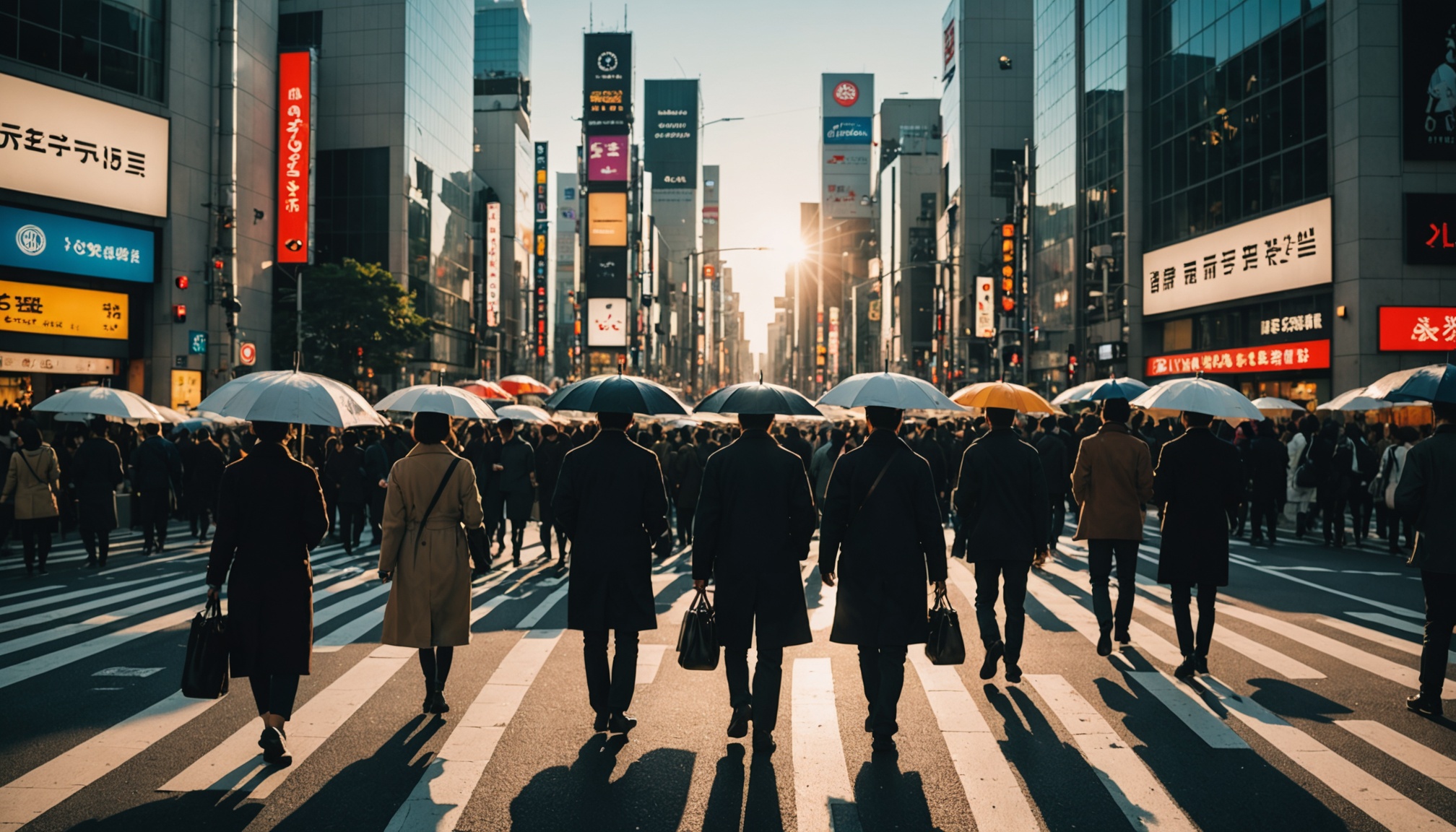
- 1. Golden Hour di Tokyo
“A busy intersection in Shibuya, Tokyo, at golden hour, hyper realistic street photography, warm sunlight through buildings, people crossing with umbrellas, wet asphalt reflecting neon lights, cinematic depth of field, 8K, shot on Leica M6, film grain subtle.” - 2. Hujan di New York
“Night time in Manhattan after rain, hyper realistic, street photography style, reflections of taxi lights on wet pavement, a lone man in trench coat walking, steam from manhole, moody atmosphere, shallow depth of field, highly detailed.” - 3. Pasar Tradisional di Hanoi
“A crowded market street in Hanoi, Vietnam, early morning, hyper realistic, vivid colors of fruits and flowers, local vendors in conical hats, natural sunlight, sharp details on textures, photographer’s perspective, f/1.4 aperture.” - 4. Lorong di Paris
“Narrow cobblestone alley in Paris, hyper realistic street photography, a couple kissing in background, warm bokeh lights from cafe, overcast sky, muted tones, authentic film look, grain structure visible.” - 5. Neon Nights di Seoul
“Hongdae street Seoul at night, hyper realistic, bright neon signs in Korean, young crowd walking, motion blur on moving cars, sharp focus on a girl with headphones, cinematic cyberpunk vibe, 8K.” - 6. Klasik di London
“Red telephone booth and double-decker bus in London fog, hyper realistic street photography, soft mist, black taxi, wet street, vintage mood, sepia tones, contrasty shadows, detailed brick texture.” - 7. Anak-Anak Main Bola di Rio
“Favela street in Rio de Janeiro, children playing soccer, hyper realistic, afternoon sun casting long shadows, colorful houses, dirt road, candid moment, high dynamic range, real-life grit.” - 8. Pengamen di Barcelona
“Las Ramblas Barcelona, a street musician playing guitar, hyper realistic, tourists walking by, sunlight filtering through trees, shallow depth of field focusing on musician’s hands, warm tones, filmic.” - 9. Sepi di Berlin
“Empty street in East Berlin, graffiti covered wall, hyper realistic, cold winter morning, a single bicycle leaning against a lamp post, bleak sky, muted colors, atmospheric perspective, detail on peeling paint.” - 10. Kopi Pagi di Melbourne
“A hipster coffee shop street in Melbourne, hyper realistic, barista pouring latte art, morning light, steam rising, depth of field, rich colors, natural surroundings, street photography snapshot.”
Cara Menggunakan Prompt di Gemini
Nah, sekarang lo udah punya 10 prompt keren. Gimana cara pakainya di Gemini? Ikuti langkah-langkah gampang berikut:
1. Buka Gemini Chat
Akses Gemini di browser atau aplikasi. Pastikan lo login pake akun Google. Gemini versi terbaru bisa generate gambar langsung, tapi kalau belum kebuka, lo bisa pake fitur “Generate with Imagen”.
2. Masukkan Prompt
Copy prompt favorit lo (misalnya yang Tokyo tadi) dan paste ke kolom chat. Tambahin instruksi kayak “Generate a hyper realistic image of this scene” atau langsung aja kirim.
3. Optimasi dengan Bahasa Alami
Lo bisa minta Gemini buat ngebantu refine prompt. Contoh: “Tolong perbaiki prompt ini supaya lebih detail untuk photography hyper realistik.” Gemini bakal kasih saran.
4. Cek Parameter Tambahan
Gemini mungkin butuh parameter kayak aspek ratio atau style. Lo bisa tambahin “aspect ratio 16:9, cinematic lighting” di akhir prompt.
5. Iterasi
Kalau hasilnya kurang oke, minta Gemini untuk generate ulang dengan tweak kecil. Misalnya ganti kata “golden hour” jadi “blue hour” buat nuansa beda.
Tips Supaya Hasil Makin Realistis
- Gunakan kata kunci kayak “8K”, “highly detailed”, “photorealistic”.
- Sebutin kamera atau lensa (misal “shot on Leica M6 with 50mm f/1.4”).
- Jangan lupa mood dan lighting (misal “moody”, “dramatic shadows”).
- Tambahkan elemen noice atau film grain buat kesan analog.
Kesimpulan
Prompt yang tepat bisa bikin karya AI street photography lo keliatan kayak hasil jepretan pro. Dengan 10 contoh di atas dan cara pakai di Gemini, lo siap eksplorasi tanpa batas. Coba satu-satu, modifikasi sesuai selera, dan jangan lupa bagikan hasilnya ke temen-temen. Selamat bereksperimen!